

Currently Empty: ₹0.00



Communication and Collaboration
Microsoft Entra Domain Services
Microsoft Entra Domain Services
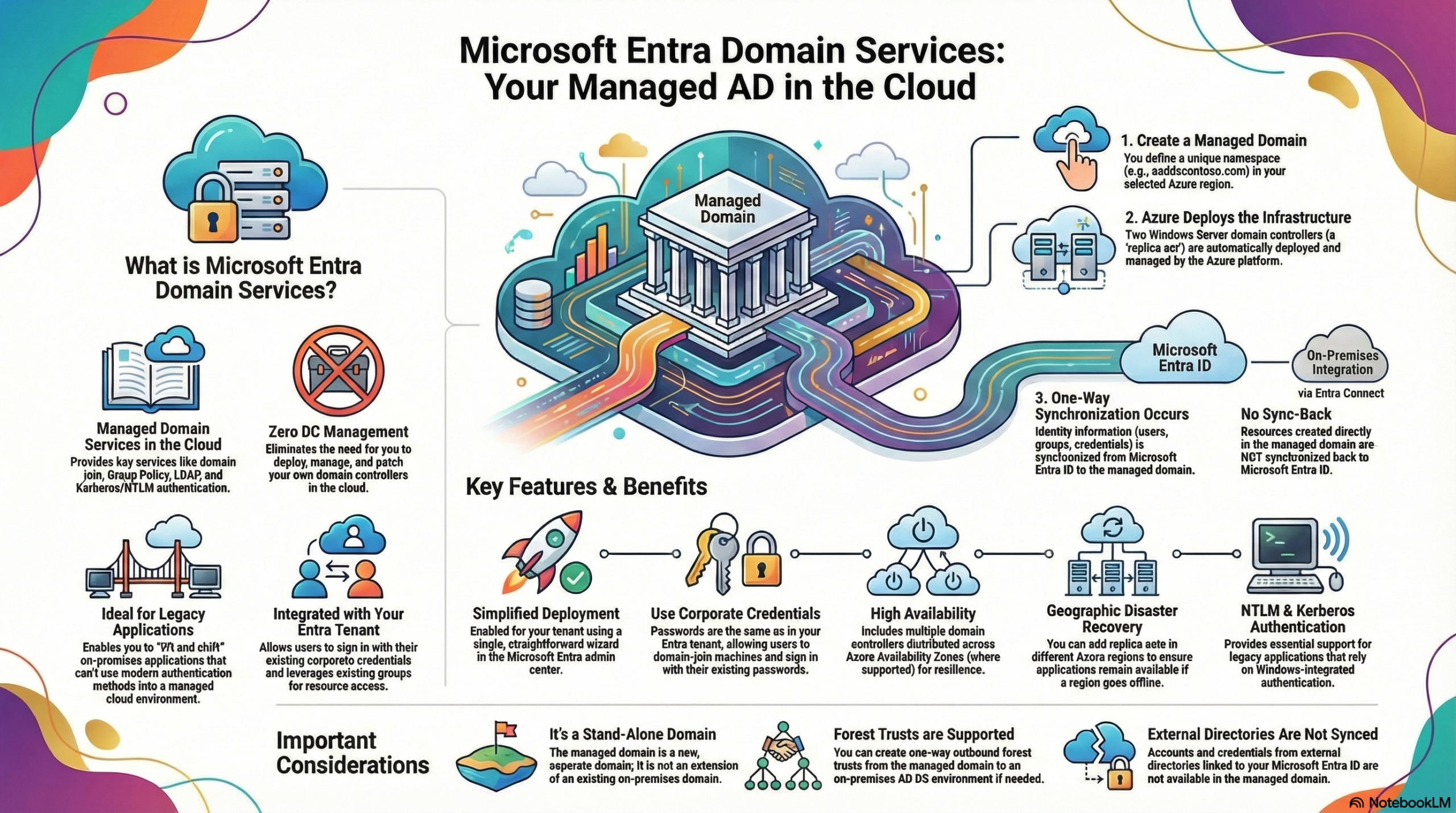
Microsoft Entra Domain Services is a managed service that provides traditional Active Directory Domain Services (AD DS) features—such as domain join, Group Policy, LDAP, and Kerberos/NTLM authentication—in the cloud. It is designed to allow organizations to “lift and shift” legacy applications that rely on these protocols to Azure without the burden of deploying, managing, and patching valid Domain Controllers (DCs).
Key Learning Points:
Microsoft Entra Domain Services is a Managed Services from Azure. Unlike running Active Directory on virtual machines, you do not need to manage, configure, or patch the Domain Controllers. Azure handles the infrastructure, including backups and encryption at rest,.
One-Way Synchronization: The service utilizes a one-way synchronization from Microsoft Entra ID to the managed domain. This means users, groups, and credentials flow from your tenant to Domain Services, but resources created directly in the managed domain do not sync back to Microsoft Entra ID.
Hybrid Compatibility: It works seamlessly with hybrid environments. Identity information from on-premises AD DS is synchronized to Microsoft Entra ID via Microsoft Entra Connect, and then automatically synchronized to Domain Services, allowing users to sign in with their existing corporate credentials,,.
Stand-Alone Architecture: The managed domain is a stand-alone domain, not a direct extension of your on-premises domain. However, if required, you can create one-way outbound forest trusts to an on-premises environment.
High Availability and Resilience: The service deploys a “replica set” of two domain controllers in a selected region. You can expand this to multiple regions or use Azure Availability Zones to ensure high availability and geographical disaster recovery,.
Once the data is synchronized, the managed domain functions like a traditional Active Directory for the applications connected to it.
- Legacy Protocols: It supports standard AD DS features including Domain Join, Secure LDAP (LDAPS), Group Policy, NTLM, and Kerberos authentication,.
- Unified Credentials: Users can sign in using their existing corporate credentials. Passwords in the managed domain are identical to those in the Entra tenant, allowing for a seamless experience when accessing legacy apps,.
Analogy: You can think of Microsoft Entra Domain Services like a specialized satellite office for your company.
- Headquarters (Microsoft Entra ID/On-Prem AD): This is where all hiring and major decisions happen.
- The Satellite Office (Domain Services): This office is built automatically (Managed Infrastructure) and receives a list of employees and their keycards directly from HQ every day (One-way Sync).
- Local Operations: The satellite office operates independently using older, specific equipment (Legacy Apps) that requires local verification.
- One-Way Rule: If someone changes their desk arrangement in the satellite office, HQ doesn’t need to know or care (No Write-Back), but if someone is fired at HQ, they are immediately removed from the satellite office list.