

Currently Empty: ₹0.00



Uncategorized
Guide on Microsoft Tenant-to-Tenant Migration
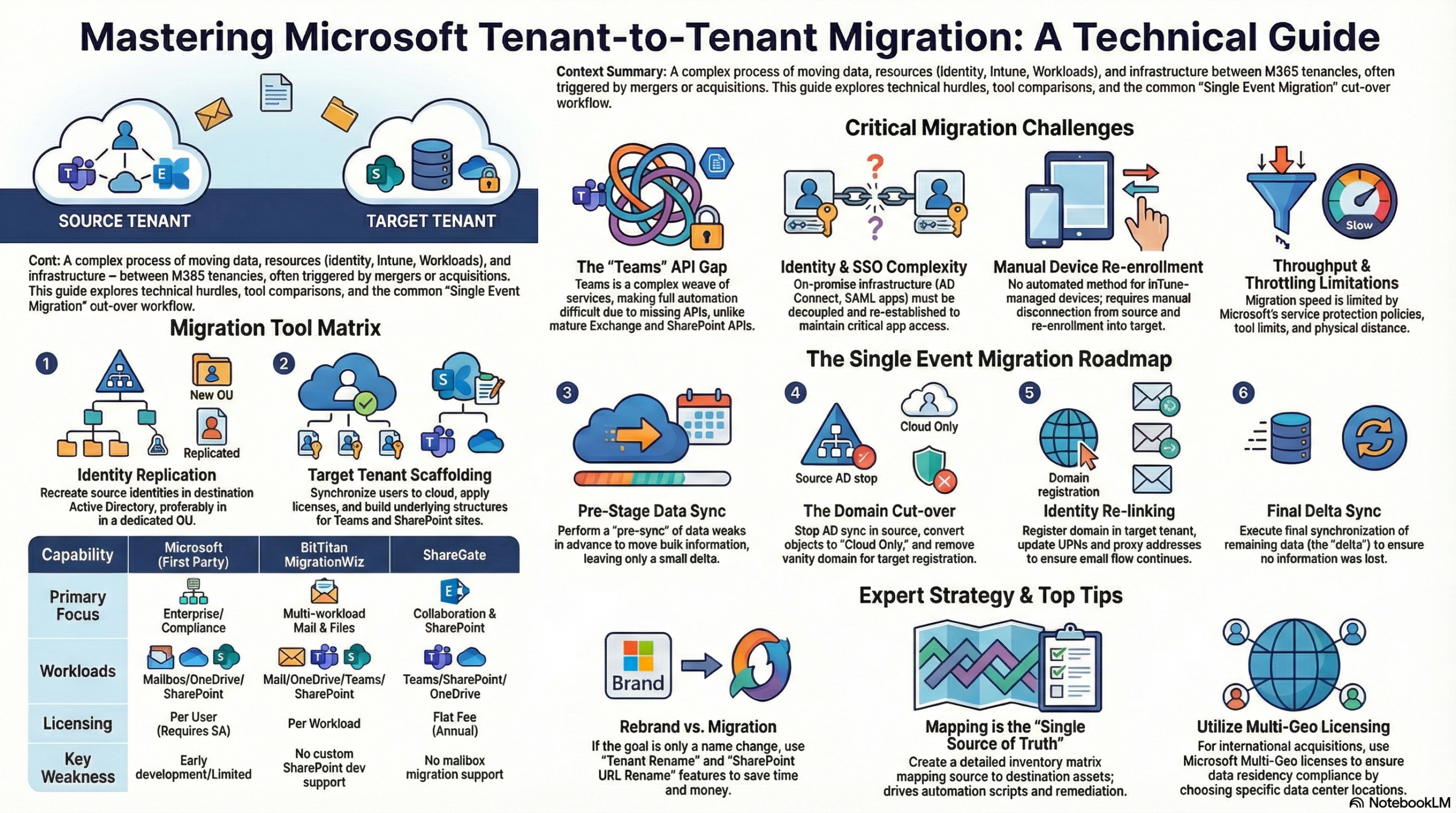
In the evolving landscape of corporate mergers, acquisitions, and rebranding, Tenant-to-Tenant (T2T) migration—moving data and resources from one Microsoft 365 tenancy to another—has become a critical IT challenge. While the concept seems straightforward, the execution involves navigating complex dependencies, licensing pitfalls, and API limitations.
Here is a guide to the challenges, tools, and strategies required for a successful migration.
The Core Challenges
Migrating a tenant is rarely just about moving files. It involves untangling a web of infrastructure dependencies:
- Complexity and Identity: You must account for on-premise infrastructure like AD Connect, Single Sign-On (SSO), and SAML applications. These often need to be decoupled from the source and reconnected to the target.
- Device Management (Intune): There is currently no robust automation for moving Intune-managed devices. They often require manual intervention to unenroll from the source and re-enroll in the target, which consumes significant IT manpower.
- The “Teams” Problem: Unlike Exchange or SharePoint, Microsoft Teams lacks a single migration API. A “Team” is a composite of Exchange mailboxes, SharePoint sites, OneDrive, and Azure Blob storage. While graph APIs exist for message import, they are heavily throttled, making full-fidelity Teams migration difficult.
- Licensing & Subscriptions: The New Commerce Experience (NCE) often locks organizations into 12-month commitments, leading to potential double billing during the transition. Additionally, mapping users from source SKUs (e.g., Business Premium) to different target SKUs (e.g., E5) requires careful planning.
The Tooling Landscape
There is currently no “one tool fits all” solution for T2T migrations. A successful project often requires a combination of tools:
- BitTitan (MigrationWiz): A popular choice for mailboxes and OneDrive. However, it has limitations with Teams chat history and custom SharePoint development.
- ShareGate: Specializes in collaboration workloads. It excels at moving SharePoint lists, metadata, and permissions, but it does not support mailbox migration.
- Microsoft Native Tools: Microsoft is developing first-party migration tools, but they are currently limited (Exchange/OneDrive), require an Enterprise Agreement (EA), and some features like SharePoint are still in preview.

Migration Ideas
1. Don’t Migrate (If You Can Avoid It) If the primary driver is rebranding, consider using the “Tenant Rename” feature rather than a full migration. You can now rename SharePoint URLs and the tenant name, saving significant time and budget.
2. Create a “Single Source of Truth” Develop a detailed inventory mapping matrix. You must map every source user, license, and asset to their destination. This is essential for handling duplicate accounts (e.g., Finance, HR) and automating permission scripts.
3. Pre-Sync Data Early Throttling is inevitable—dictated by Microsoft, the tool vendor, and data center geography. Allow ample time to pre-sync data while users are still working in the source environment to minimize the data load during the cutover.
4. Leverage Multi-Geo Licensing If you are acquiring a company in a different region (e.g., a UK firm buying a German firm), use Multi-Geo licensing to meet data residency requirements without needing separate tenants.
Migration Strategies
- Single Event (“Big Bang”): The most common approach. It involves moving everything in one go. While it carries higher risk and shorter timelines, it avoids the complexities of long-term coexistence. Microsoft generally recommends avoiding this if the tenant exceeds 15,000 seats or 7TB of content.
- Phased Migration: A gradual move that lowers risk but introduces “coexistence” headaches. For example, mail forwarding between tenants is treated as external email, which can complicate communication flows.
The Execution Lifecycle (Single Event)
- Prepare Identity: Replicate source users into the target Active Directory (usually in a specific OU) and sync them to the cloud via AD Connect.
- Scaffolding: Build the target structure, including licensing, Teams channels, and SharePoint sites.
- Pre-Stage Sync: Copy the majority of data while the source is still active.
- The Cutover:
- Stop AD Connect at the source to convert users to “Cloud Only”.
- Remove the domain from the source tenant (this can get stuck, so clean up objects beforehand).
- Register the domain in the target tenant.
- Perform the final data sync and update User Principal Names (UPNs).