

Currently Empty: ₹0.00
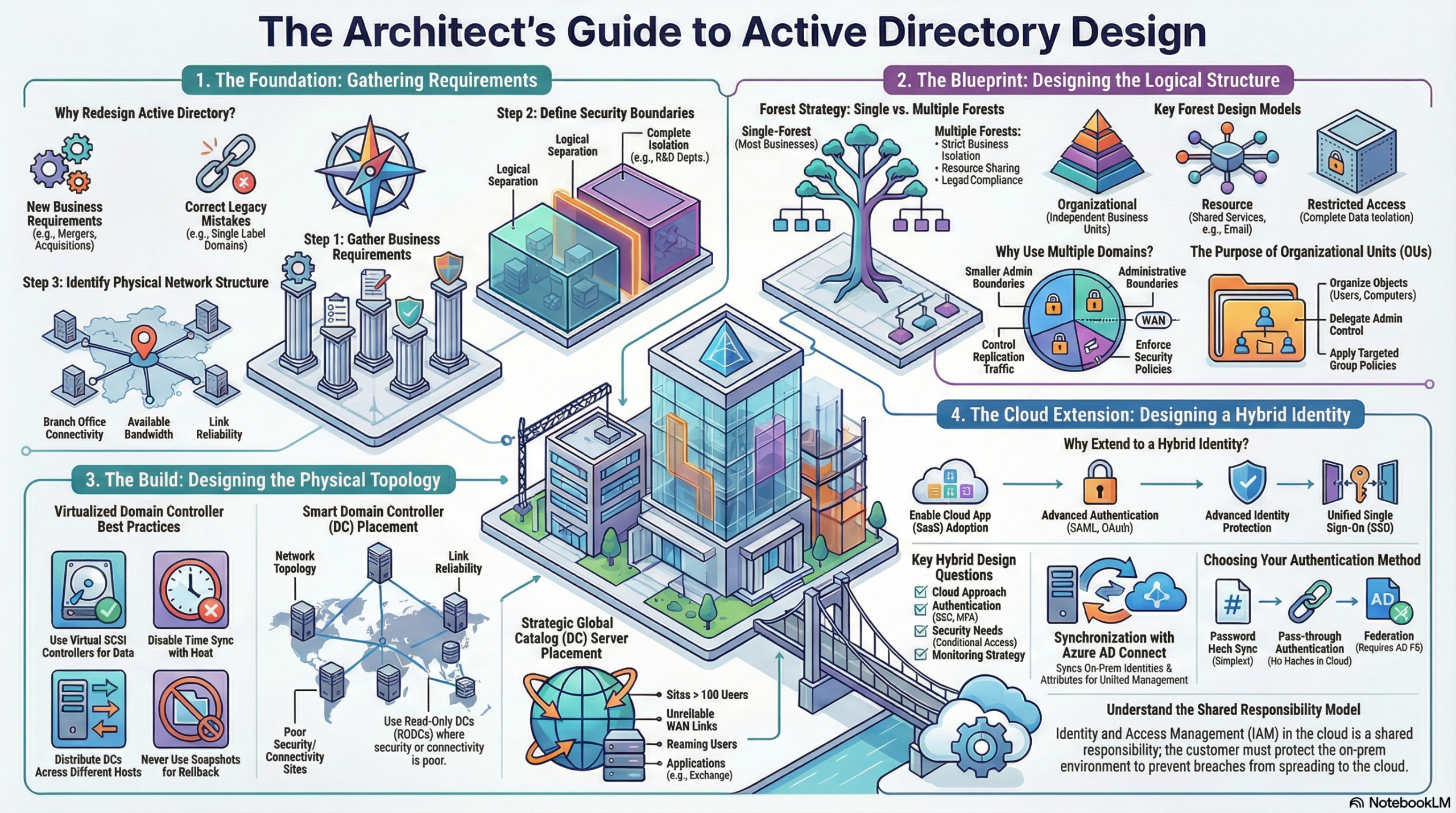
This lesson describes Active Directory Infrastructure design of logical and physical topologies, as well as hybrid identity planning.
1. Design Requirements
Key Considerations: Designs must account for operational impact, compliance/legal requirements, productivity, and security.
Information Gathering:
- Security Boundaries: Define boundaries based on distinct business operations (e.g., separate companies within a group) or logical separation needs (e.g., R&D departments requiring schema changes).
- Physical Network: Identify the number of branches, connectivity methods, and bandwidth reliability to identify bottlenecks.
2. Designing the Forest Structure
The forest is the security boundary of the identity infrastructure.
Deployment Types:
- Single Forest: Low complexity and cost; suitable for most business models.
- Multiple Forests: Required for strict isolation, rapid directory changes (Dev/Test), decentralized IT operations, or incompatible legal requirements.
Autonomy vs. Isolation:
- Autonomy: Independence to manage resources (Service or Data) but allows higher-level admins (Forest admins) to retain ultimate control.
- Isolation: Exclusive control where no external administrators have access. Required for strict data or service separation.
Forest Design Models:
- Organizational Forest: Resources, data, and identities are managed independently in separate forests.
- Resource Forest: Dedicated forest for shared applications/services (e.g., Exchange). User accounts remain in the organizational forest and access resources via trust relationships.
- Restricted Access Forest: Completely isolated forest with no trusts, ensuring total data and identity separation.
3. Designing the Domain Structure
Domains create smaller administrative boundaries and partition the directory for controlled replication.
Domain Models:
- Single Domain: Easiest to administer, but all data replicates to all DCs,.
- Regional Domain: Separate domains for different geographical locations (connected via WAN). Reduces replication traffic across WAN links.
- Branch/Site Domain: Independent IT operations per site; increases complexity and risk.
Naming: Use routable DNS names (e.g., prividha.com) and avoid Single Label Domains (SLDs).
Root Domain Strategy:
Dedicated Root: Contains only service admin accounts (Enterprise/Schema Admins) and no user data.
Regional Root: A regional domain (e.g., US.Prividha.com) acts as the forest root.
4. Designing the OU Structure
OUs are used to organize objects, delegate control, and apply Group Policies.
OU Design Models:
Container Model: No child OUs; large administrative boundaries (e.g., all users in one bucket). Difficult to apply specific policies.
Object Type Model: Grouped by object class (Users vs. Computers). Flexible but can become complex.
Functions Model: Grouped by function (e.g., Web Servers, DB Servers). Good for identifying privileged accounts,.
Geographical Model: Grouped by location (e.g., Asia, Europe). Ideal for delegating control to regional IT teams.
Department Model: Mimics the org chart. Easy to delegate to managers but difficult to place shared resources.
Hybrid Model: A mix of models (e.g., Geo > Accounts > Function). Offers maximum flexibility-.
5. Physical Topology Best Practices
Virtual Domain Controllers (DCs):
- Do: Distribute DCs across different hosts/clusters. Use separate virtual SCSI controllers for the database (
ntds.dit). Disable host time sync. - Don’t: Clone VHDs, take snapshots, pause DCs for long periods, or use the Hyper-V export feature for backups.
DC Placement: Place DCs based on network topology and link reliability. If physical security cannot be guaranteed in a remote site, use a Read-Only Domain Controller (RODC).
Global Catalog (GC) Placement: Place a GC server in sites with over 100 users, sites with roaming users, or sites hosting applications like Exchange.
6. Designing Hybrid Identity
Extending on-premises AD to Microsoft Entra ID (Azure AD).
Cloud Approaches:
- Cloud Only: No on-prem footprint.
- Future Cloud Only: No new on-prem investment; transitioning to cloud.
- Permanent Hybrid: Long-term coexistence due to compliance or legacy apps.
- Forced to Cloud: Vendor mandates SaaS usage-.
Synchronization Strategy (Microsoft Entra ID Connect):
- Password Hash Sync: Easiest implementation; syncs hashes to the cloud.
- Federation (AD FS): Complex; authentication remains on-prem. Required for complex auth scenarios.
- Pass-through Authentication: Agent-based; authentication remains on-prem without complex AD FS infrastructure,.
Topology Support: Supports Single Forest-Single Tenant or Multiple Forests-Single Tenant. Note: Users existing in multiple forests must be consolidated/matched (e.g., via mail attribute or GALSync).